
Raising pick-up disputes is now much simpler for Snapdeal sellers
 By Rebecca Menezes
Timely pick-ups are essential for flawless service in the ecommerce industry. Snapdeal knows that quite well as it maintains the fastest delivery time among the top marketplaces. To maintain the efficiency of its delivery system, all pick-up disputes must be effectively taken care of.
To simplify the process of raising pick-up disputes, Snapdeal now allows sellers to raise the right from the order panel.
How to raise pick-up disputes from Snapdeal’s order panel?
This simplified version of raising pick-up disputes was announced through email. It explains the new process through the following steps:
Step 1 – Open the ‘New Orders’ tab on the order panel. Next select the ‘Handover’ tab.
Step 2 – Click on the ‘Raise Pick-up dispute’ button near the hand-over sheet (HOS) you wish to dispute. [For drop-ship, it is manifest, for one-ship it is HOS and for OC Plus it is stock transfer note (STN)]
Step 3 – By default, all the printed HOSs of the same courier partner which are yet to be picked will be selected. The seller can choose which sheets to choose if he doesn’t want to use all.
Step 4 – Share the category of the issue and comments about the same. Files of up to 10 MB can be attached to support the issue.
Step 5 – Click submit to raise the dispute.
Snapdeal asks its sellers take note of the following points with regards to this process of raising disputes:
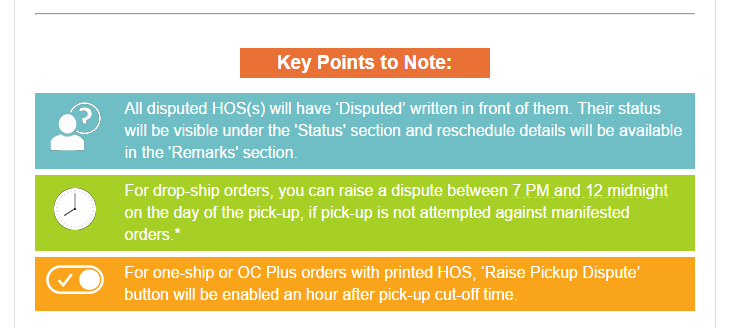
(Obtained from Snapdeal email to online sellers)



No comments yet. Be the first to comment!